
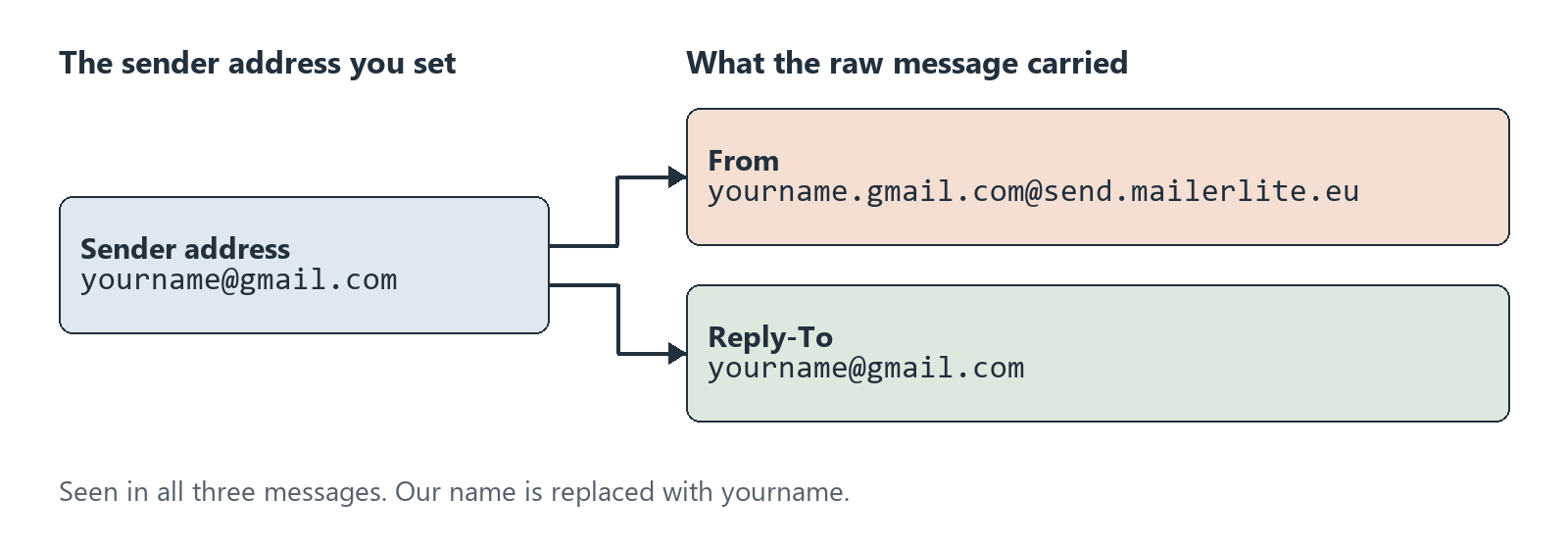
If you send through MailerLite from a Gmail address, the From line may not show that address. In our three messages, From used a MailerLite address. Reply-To contained our Gmail address. We opened the raw source of those messages, which our account had sent to our own inbox, then pressed Gmail’s unsubscribe control on one of them.
Gmail reported SPF, DKIM, and DMARC passes for all three messages. Only the automation message had both one-click unsubscribe headers. The [Test] email and the double opt-in confirmation did not, so those two can’t confirm whether this feature works on a regular send. After we pressed Gmail’s control, the contact already read Unsubscribed at our first look nine seconds later. Its activity log recorded a link click. About five minutes later its location and time zone read differently, and we don’t know why.
Our earlier double opt-in test produced two of these messages. No new email was sent for this post.
The setup
- Account: one MailerLite account with a Gmail address as the sender and no authenticated domain.
- Messages: a double opt-in confirmation and an automation welcome email, both sent November 1, 2026, plus a message with the [Test] prefix from October 23. MailerLite sent all three while the account was on its 14-day trial.
- Recipient: Gmail addresses in our own mailbox.
- How we read them: Gmail’s Show original on November 6, 2026, saving each source privately. Below, we replaced our name with
yournameand cut tokens and IDs. - What counts: a header is present only if it appears in the raw source. Pass means Gmail’s own
Authentication-Resultsline says pass.
What the headers said
| Header | Confirmation email | Automation email | [Test] email |
|---|---|---|---|
| From | yourname.gmail.com@send.mailerlite.eu |
Same | Same |
| Reply-To | yourname@gmail.com |
Same | Same |
| Sender | Absent | yourname=gmail.com@mlsend.com |
Same as automation |
| Return-Path domain | send.mailerlite.eu |
Same | Same |
| DKIM signatures | send.mailerlite.eu and mlsend.com, both pass |
Same | Same |
| SPF | Pass | Pass | Pass |
| DMARC | Pass, p=NONE, header.from=mailerlite.eu |
Same | Same |
| List-Unsubscribe | Absent | One HTTPS address on clicks.mlsend.com |
Absent |
| List-Unsubscribe-Post | Absent | List-Unsubscribe=One-Click |
Absent |
| Precedence | Absent | bulk |
Absent |
| Gmail’s unsubscribe control beside the sender | Not shown | Shown | Not shown |
On the automation email, both DKIM signatures listed List-Unsubscribe and List-Unsubscribe-Post among their signed headers, which is what RFC 8058 asks for.
Reading the results
Your Gmail address ends up in Reply-To. MailerLite’s subdomains guide, last edited February 2, 2024, says that when you send from a free domain, it will “automatically add a MailerLite subdomain to your sender address.” Its example turns a Yahoo address into john.yahoo.com@send.mailerlite.eu, and its stated reason is that “This alteration helps your emails pass authentication checks.” We did not send a test reply, so we can only say what the header shows.
The authentication belongs to MailerLite’s domain. The From address, the first DKIM signature, and the Return-Path all use send.mailerlite.eu, so they line up. RFC 9989, the DMARC standard that replaced RFC 7489 in May 2026, calls this kind of match “aligned.” Gmail reported a DMARC pass with the policy p=NONE, naming mailerlite.eu, the parent of that subdomain. RFC 9989 describes none this way: “The Domain Owner offers no expression of preference.” This pass does not test a domain you own. If you later authenticate your own domain and publish DMARC with a reporting address, the open-source parsedmarc project can parse the reports.
A [Test] email can’t check this feature. This matches MailerLite’s list-unsubscribe guide, last edited January 8, 2024, which says the header is included by default and adds: “Keep in mind, [Test] emails will not show a list-unsubscribe header link.” We add one finding: the double opt-in confirmation lacked the headers too. To check, look at an email a real workflow or campaign sent.
What the rules ask for
Google’s sender guidelines and Yahoo’s sender best practices set the outside requirements. Google’s guidelines cover personal Gmail accounts, and its stricter section applies to senders of more than 5,000 messages a day: “Marketing messages and subscribed messages must support one-click unsubscribe, and include a clearly visible unsubscribe link in the message body.” It also says “Your DMARC enforcement policy can be set to none.” Yahoo tells bulk senders to “Honor unsubscribes within 2 days.”
The header rules themselves are in RFC 8058, which builds on RFC 2369. RFC 8058 says the List-Unsubscribe header “MUST contain one HTTPS URI,” and that the message “MUST have a valid DomainKeys Identified Mail (DKIM) signature that covers at least the List-Unsubscribe and List-Unsubscribe-Post headers.”
What happened when we pressed unsubscribe
We used the automation email, sent to an address we own that was used only for testing. All times are KST on November 6. MailerLite’s activity list shows no time zone, and we read it as UTC.
| When (KST) | What we did or saw |
|---|---|
| 11:33 | Opened the message; Gmail showed its unsubscribe control beside the sender |
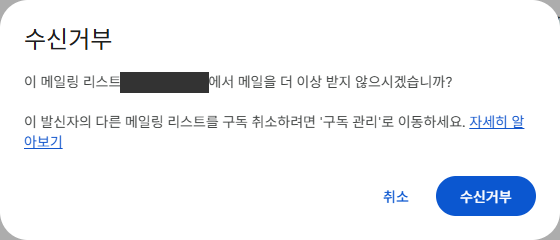
| 11:35:20 | Confirmed the dialog; Gmail then showed a notice that we had unsubscribed from the list |
| 11:35:23 | MailerLite’s time for “Status changed to unsubscribed” |
| 11:35:29 | First read of the profile: Unsubscribed, with no click or open listed for that day |
| 11:35:46 | Second read: Opened 0%, Location South Korea, time zone Asia/Seoul |
| 11:38 to 11:39 | Used the same contact in a separate import test: a copy/paste import, then Import selected. It stayed Unsubscribed and joined that import’s group |
| 11:40 | Third read: new rows for an open, an unsubscribe click, and that group, Opened 100%, Clicked 0%, Location United States, time zone America/Los Angeles |
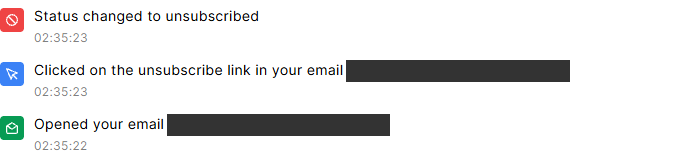
Three details stood out.
- It looks like a click. The log said “Clicked on the unsubscribe link,” although no page opened on our side, and the profile’s Clicked rate stayed at 0%. RFC 8058 has the mail receiver send “an HTTPS POST to the HTTPS URI in the List-Unsubscribe header,” which would fit, but we didn’t capture that request. A log entry worded this way doesn’t tell you whether someone used the link in your footer or a mailbox button.
- The open row appeared later. Its timestamp was one second before the unsubscribe event, although we had opened the message about two minutes before that. It also appeared only after our first two reads.
- Location and time zone changed. The contact read South Korea and Asia/Seoul at our second read. At our third, after the import test, it read United States and America/Los Angeles, and it stayed that way after we later set the contact back to Active. We don’t know the cause.
What MailerLite’s guides say about those rows
The guides explain part of this, not all of it. We didn’t capture the request, and the import test came before the third read, so we can’t name the cause.
- Opens: the tracking guide says MailerLite “Tracks opens using an invisible beacon embedded in your campaign.” The opens by location guide says that for Gmail users who open email in a browser, “Gmail uses its own server IP address,” so those emails “will be marked as opened in the United States.” That describes campaign reports, not contact profiles. Gmail’s own image help says “Senders can’t use image loading to get information about your computer or location,” and also that “Sometimes, senders may know whether you’ve opened an email that has an image.”
- Time zone: the time zone guide says “Time zone is set based on the Sign up IP or IP from Clicks,” and that opens don’t update it. The guide does not tell us which IP was used for this event.
- Location: the same guide says “Location will only update when a subscriber signs up to another form from a different IP address.” We filled in no signup form, so the location change doesn’t match that sentence.
A 2018 study by Princeton researchers also describes Gmail’s image proxying: “some email servers, notably Gmail, proxy embedded content,” which “prevents third parties from learning the user’s IP address.” It doesn’t cover the United States location or unsubscribe requests, so it is background here, not proof.
One other contact in this account gives a rough comparison. Its log shows an unsubscribe-link click dated October 23, the status change came 24 seconds later, and its profile read South Korea and Asia/Seoul when we checked on November 6. We have no record of which control was used for that one.
Check your own email
In Gmail, open a real message, choose Show original, and save the source as a file such as message.eml. This short script uses only Python’s standard library, and we ran it on our three saved sources. Save it as headers.py and run python headers.py message.eml. It prints header values and does not verify signatures, and True only means both names are on the signature’s list. Its output can include your address and an unsubscribe link with a token in it, so don’t paste it in public.
import email, re, sys

with open(sys.argv[1], "rb") as f:
    msg = email.message_from_binary_file(f)
for name in ["From", "Reply-To", "Sender", "Return-Path",
             "List-Unsubscribe", "List-Unsubscribe-Post", "Precedence"]:
    print(f"{name}: {msg.get(name, '(absent)')}")
for value in msg.get_all("Authentication-Results", []):
    print("Authentication-Results:", value)
for value in msg.get_all("DKIM-Signature", []):
    flat = re.sub(r"\s+", "", value)
    tags = dict(t.split("=", 1) for t in flat.split(";") if "=" in t)
    signed = set(tags.get("h", "").lower().split(":"))
    print(tags.get("d", "(no d= tag)"), "lists one-click headers as signed:",
          {"list-unsubscribe", "list-unsubscribe-post"} <= signed)
What this means if you send from a free address
- Check a real send. A clean [Test] email can’t show you one-click support.
- Keep an unsubscribe link in the body. Google’s section for senders above 5,000 messages a day to personal Gmail accounts asks for both, and the message we tested had a footer link as well as the header.
- Read click rows with care. An unsubscribe-click entry does not tell you which control was used.
- Recheck location data. Before using this kind of contact’s location for targeting or scheduling, look at it again.
- Treat a pass as MailerLite’s pass. Our results came from MailerLite’s domain, and MailerLite’s guide recommends a custom domain for a business.
The limits of this test
This was three messages, one mailbox, and one press of a button. It is one observed case.
- Trial-era messages. All three were sent during the trial. The press happened after the account moved to the Free plan, but we sent nothing on Free, so we can’t say Free-plan email has the same headers.
- Gmail only. We did not check Yahoo, Outlook, or Apple Mail, and we used Gmail’s web app in Korean. MailerLite’s guide says Gmail decides when to display the control, so another mailbox may behave differently.
- Automation only. We did not read a campaign’s headers.
- No authenticated domain. We did not test sending from an authenticated domain.
- No delivery measurement. A pass in these headers says nothing about inbox placement for a real list.
- Cause not observed. We didn’t see the request Gmail sent, so the reasons for the open row and the location change are unknown.
- A second test in between. Between the second and third reads, the same contact went through a separate import test. We didn’t measure that test’s effect apart from the button’s, so we can’t say whether it played any part in the new rows or the location change.
Leave a Reply