
Our first MailerLite test used an address that was already an Active subscriber. It received an automatic welcome email, but that test did not show what a new subscriber would see before confirming their signup.
On November 1, 2026, we tested that missing step with a new MailerLite subscriber record. We received a confirmation email first. After we followed its link, the record became Active and a welcome email arrived in Gmail. Here is what we checked, including the limits of that result.
The setup and its limits
We used a previously unused Gmail plus alias that delivered to the same business inbox we controlled for the first test. It created a new record in MailerLite; it was not a new Gmail account or a different mail provider. Before submission, the subscriber list contained only our existing, Unsubscribed address.
The account showed a Free base plan alongside a 14-day trial banner with five days left. We therefore do not treat this as a Free-only test.
The hosted form had double opt-in turned on. Its welcome workflow used a form-completion trigger and one email step, with no delay step. We activated that workflow for this test. It already had one historical completed run and one sent email, with nothing in progress. Those starting totals matter when reading the final counts.
We submitted the form once using the alias. All observation times below are Korea Standard Time (KST).
Before clicking the confirmation link
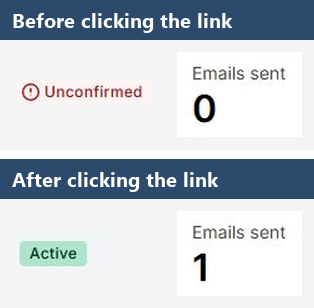
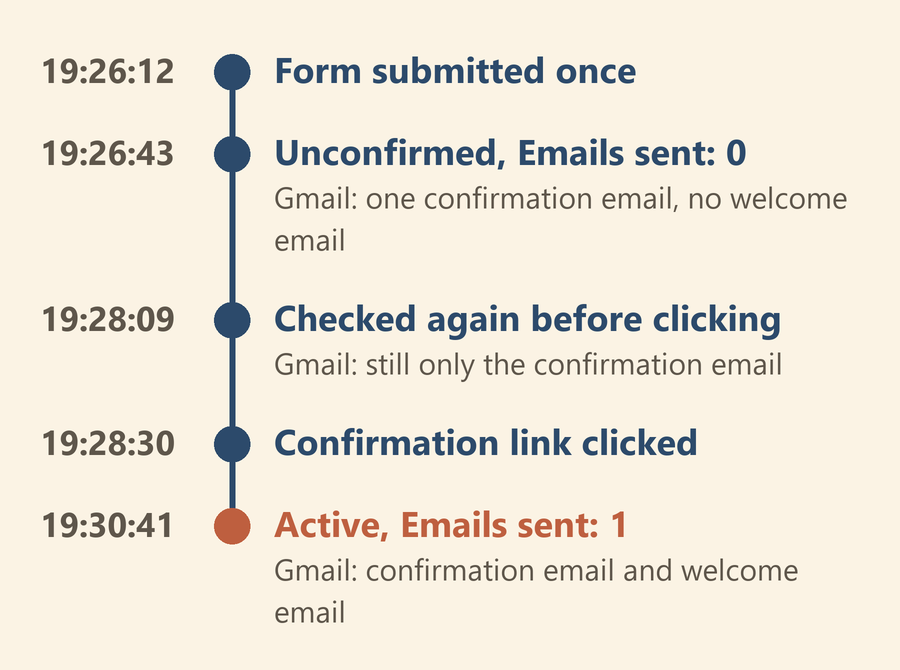
We submitted the form at 19:26:12. At our first check, at 19:26:43, the submission had succeeded and MailerLite showed the new record as Unconfirmed, with Emails sent: 0.
A recipient-specific search across all mail in Gmail showed one confirmation email and no welcome email. The confirmation email was already in Gmail while MailerLite showed Emails sent: 0, so in this run that count did not include the confirmation email. We treated the confirmation and welcome messages as separate observations.
We checked again at 19:28:09, before clicking the confirmation link. The confirmation email was still the only matching message. The workflow remained at its historical totals of one sent and one completed, with nothing in progress.
These were checks at two points in time. No welcome email appeared in those pre-confirmation checks; we did not test how long an unconfirmed record could remain in that state.
After confirming the signup
We clicked the confirmation link at 19:28:30 and reached the signup confirmation page. We then checked both the subscriber record and the received mail.
At 19:30:41, MailerLite showed the record as Active, with Emails sent: 1. Its activity listed activation through signup confirmation, followed by the automation email being sent.
Gmail now listed two matching messages: the confirmation email at 19:26 and the welcome email at 19:28 (this inbox view showed times only to the minute). We checked that the welcome message's recipient matched the test alias. This was a received message, not just a workflow status or an email preview.
We have not converted those timestamps into a delivery-speed claim. MailerLite's activity timestamps and Gmail's displayed times are different observations, and we did not continuously monitor the mailbox for the exact arrival moment. The supported result is the sequence we observed: confirmation received, confirmation link followed, Active status, and welcome email received.
Ending the test
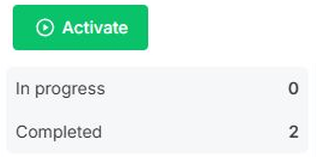
The workflow's cumulative sent and completed counts rose from one to two. That represented one new welcome run added to the earlier run, not two welcome emails from this submission. Nothing remained in progress, and the failed count was zero.
We paused the workflow after completion and checked that its Activate button was visible. The form's double opt-in setting remained on. We kept the test subscriber Active to preserve the record; we did not run another unsubscribe test here.
What to check in your own test
This run filled one gap left by our first article: we observed a new MailerLite record before and after signup confirmation. It remains one submission, one alias, and one Gmail inbox under the account conditions described above.
If you repeat the check, record the starting workflow totals and distinguish the confirmation email from the welcome email. Check the subscriber status before following the link, then compare the status, activity, and actual received message afterward. A success page or a sent count alone does not show the whole path.
We have not established the same result on a Free-only account, on a phone, or with another mail provider. The alias also did not give us an independent inbox. Those are separate checks before treating this setup as ready for customers.
Test date: November 1, 2026. Observation times: Korea Standard Time (KST).
Ohrenmail is published by OHREN_Lab. Read how we test and report limits, or send a question or correction. See our Privacy Policy.
Leave a Reply