
Removing a subscriber from a group and adding them back looks like an easy way to send a welcome email again. We tried it with one contact we own and two active workflows that start from the same group. One, called ON here, allows re-entry with a one-day delay. The other, called OFF, has re-entry turned off.
A rejoin about two minutes after the first email added no run to either workflow. A rejoin 24 hours and 41 minutes after the first email started a new run in ON, and a second email from it reached the inbox. OFF stayed at one run through our last read, about 12 hours after that rejoin.
Our double opt-in test followed a new subscriber from confirmation to a welcome email, and our groups vs segments test changed group memberships while a contact stayed Active. This one looks at the second trip through a workflow.
What MailerLite’s documentation says
For workflows that start when someone joins a group, MailerLite’s Automation triggers guide, last edited June 9, 2026, describes a setting called Allow subscribers re-enter automation. It says to check the box “if you want subscribers to re-trigger the workflow every time they rejoin the trigger group. However, subscribers can only be triggered once every 24 hours.” With the box unchecked, “subscribers will complete the workflow once and never trigger it a second time.” MailerLite’s Multiple automation triggers guide says it this way: “Workflows can only be reactivated once in 24 hours.”
The triggers guide also notes that a subscriber can’t rejoin a group they already belong to. They must be removed first, so each rejoin in this test has two steps.
The settings screen in our account offered a choice the guide does not describe. Under Time for re-enter, it listed As soon as they match the triggers and Add delay.
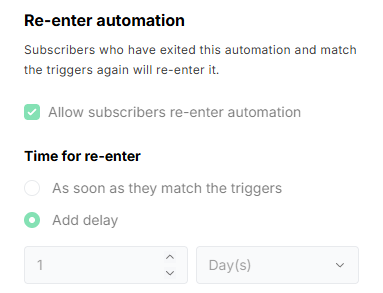
So the documentation says 24 hours, and the screen showed an immediate option. We selected Add delay with 1 Day(s), and we did not test how the two relate.
The setup
We ran the test from November 4 to November 6, 2026, Korean time, in the MailerLite web app. The account displayed a 14-day trial. All times below are Korea Standard Time (KST, UTC+9). MailerLite’s activity lists show no time zone. Read as UTC, they agree with the Korean times Gmail showed, so we converted them that way.
One subscriber record, an address in our own inbox, showed Active at every check. That matters because MailerLite says automations can only trigger for active addresses. One group triggered both workflows, and each workflow held a single welcome email. The settings differed:
- ON: Allow subscribers re-enter automation checked, with Add delay set to 1 Day(s).
- OFF: Allow subscribers re-enter automation unchecked.
Each rejoin was a manual group change: we removed the contact from the group, then added the same contact back.
What happened
| When (KST) | What we did or checked | ON | OFF |
|---|---|---|---|
| Nov 4, 20:34:55 | Contact joined the group | Email sent at 20:35:00 and received | Email sent at 20:35:00 and received |
| Nov 4, 20:37:17 | Contact added back, 16 seconds after removal and about 2 minutes after the first email | No new run at the 20:38 check | No new run at the 20:41 check |
| Nov 5, 21:15 | Checked before the next rejoin, with the contact still in the group | One run | One run |
| Nov 5, 21:16:33 | Contact added back, 73 seconds after removal and 24 h 41 m after the first email | New run; email sent at 21:16:38 and received | No new run |
| Nov 6, 09:15 | Last counter read | Two runs | One run |
The next table shows the workflow counters on either side of the long rejoin. “Before” is November 5 at 21:15 KST and “after” is November 6 at 09:15 KST. The inbox row counts individual messages, opened and counted on November 5 at 21:13 and 21:31 KST. A search on November 6 showed the same three rows.
| Counter | ON before | ON after | OFF before | OFF after |
|---|---|---|---|---|
| Started | 1 | 2 | 1 | 1 |
| In progress | 0 | 0 | 0 | 0 |
| Completed | 1 | 2 | 1 | 1 |
| Canceled | 0 | 0 | 0 | 0 |
| Failed | 0 | 0 | 0 | 0 |
| Total emails sent | 1 | 2 | 1 | 1 |
| Messages in our inbox | 1 | 2 | 1 | 1 |
The contact’s activity list showed the ON send 5 seconds after the add, with no OFF send. Gmail, which displays minutes only, dated the new message 9:17 PM. The workflow reports agreed: ON showed 2 sent and 2 delivered with no bounces, and OFF showed 1 sent and 1 delivered with no bounces.
The completed lists show the same split. MailerLite’s activity guide says this list shows subscribers who finished every step, “along with the date and time they completed it.”
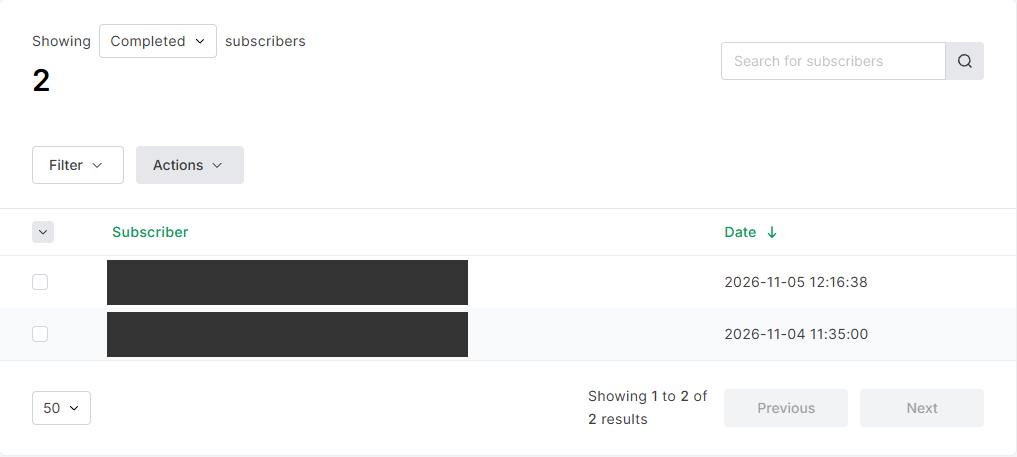
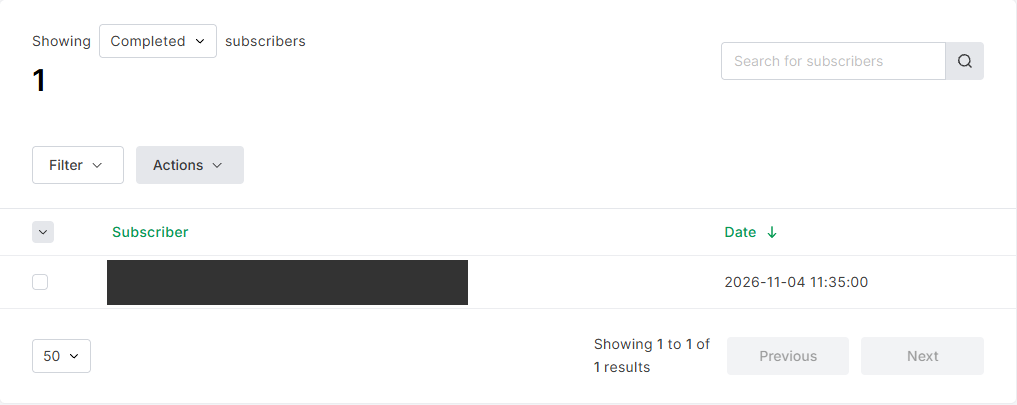
By the next evening, the short rejoin had not turned into a delayed run. The contact stayed in the group after it, and at 21:15, about 24 hours and 40 minutes after the first email, ON still showed one run and the inbox still held two messages. The second ON run appeared after we removed the contact and added it back.
The numbers did not all move at once
Our first check came about 38 seconds after the send. ON already showed Started 2 and Completed 2, while Total emails sent still read 1. The contact’s profile, read about 56 seconds after the send, showed 3 emails sent across both workflows. An inbox search about 68 seconds after the send did not list the new message. At the next check, about 12 minutes later, ON showed 2 emails sent and the search listed the new message.
A single reading can look like a contradiction. Reading the counters, the completed list, the contact’s activity, and the inbox separately, then reading them again, gave us a consistent picture.
What this means for a welcome sequence
These points apply to the setup we ran, with re-entry on and a one-day delay.
- A quick remove and re-add may not restart the email. Here it added no run, and none had appeared by the next evening. Checking the counters tells you more than assuming the email went out.
- The later re-add did restart it. The same contact in the same group got a new run and a new message, with no change to the workflow settings.
- Re-entry off produced nothing new. OFF showed no new run after either rejoin through our last read, which fits what the guide says about the unchecked box.
- Other documented routes exist. MailerLite’s guide to adding subscribers to a workflow covers an Add subscribers action, which it says “bypasses trigger checks,” and a Re-add to the sequence action in the Activity tab’s Completed list. We did not use either one here.
The limits of this test
This was one contact we own, one long-gap rejoin, and two workflows in one trial account. It is one observed case and not a rule for MailerLite.
- We did not establish how MailerLite counts the selected delay, or whether the delay, the documented 24-hour limit, or something else explains the short rejoin that added no run. Either the delay or the limit could account for both results.
- OFF was observed for about 12 hours after the long rejoin. Whether it stays at one run later is not established.
- The watch for a delayed run after the short rejoin ended about 24 hours and 40 minutes after the first email, so that observation is short.
- We matched the new inbox message to the ON send by subject, order, and minute. The search that did not list it reused an already loaded Gmail page, so we can’t say whether delivery time or a stale page explains the miss.
- We did not run the immediate option, a signup form, double opt-in, unsubscribing and resubscribing, or a larger list. This test tells you nothing about them.
- The settings we describe were on a trial account. We did not check other plans.
Leave a Reply